
GM Killed CarPlay… But This Open-Source Hack Brings It Back in Their EVs!
New General Motors electric trucks and SUVs shipped without Apple CarPlay and Android Auto. For many drivers that is not a minor annoyance — it breaks familiar navigation, calling, and messaging workflows that make driving safer and more productive. An open-source workaround restores wireless CarPlay on GM EVs without dealer reprogramming or warranty-risky tampering.
EDIT 12/14/2025: Posted Technical Video Showing How To Compile The App
What the workaround is and how it works
The solution combines two parts: a hardware dongle and an open-source application port. The hardware is a CarLinkit-style adapter that plugs into the vehicle and presents a USB-A CarPlay endpoint. Because many GM EVs use USB-C, a simple USB-A to USB-C adapter is used to connect the dongle to the center console port. The dongle then provides a wireless CarPlay connection to the phone.

Important software note: The hardware does not function alone. An open-source app port is required to bridge the dongle and the vehicle’s Android-based head unit. Two community developers — Rwerksman and Tachi91 — have driven the effort and made the port available on GitHub. At the moment the app is not distributed through official app stores, so installing it currently requires compiling and publishing the app for testing. The developers plan to publish an official app in the future.
Real-world performance — what to expect
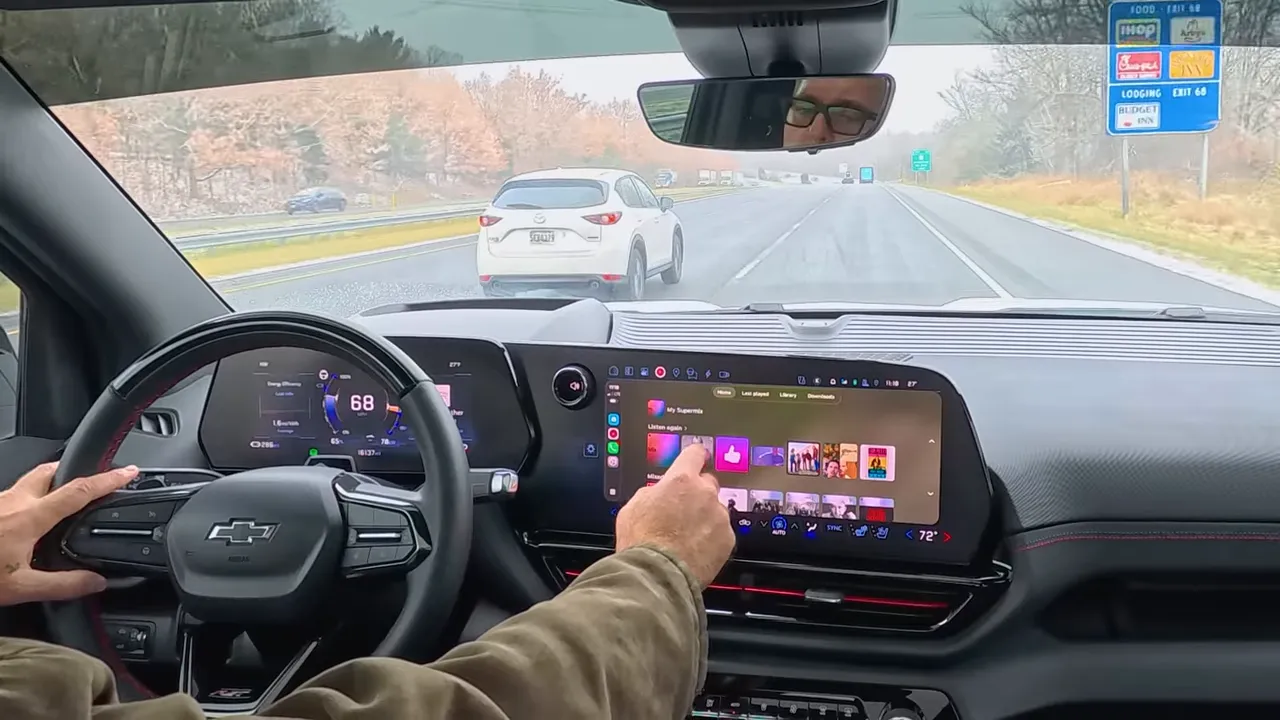
Once set up the CarPlay experience is impressively close to what longtime users expect. Key behaviors observed include:
- Wireless CarPlay that feels snappy and responsive for navigation and apps.
- Popular apps including Waze, Google Maps, music apps, and ABRP can be launched and controlled via the head unit.
- Siri works for text messages, navigation commands, and quick queries once phone lock/voice settings are configured correctly.
- Phone call handoff behaves as expected, with the system routing calls to the vehicle’s internal calling function.
- Integration with vehicle features like the blind spot camera works seamlessly — the camera overlays when the turn signal engages and returns to CarPlay afterward.

Music playback works well and supports local downloads in apps like YouTube Music, which can be handy when cellular coverage is limited or when streaming is unreliable.
Limitations and caveats
- Android Auto is not supported yet. The current port targets Apple CarPlay only. Android support may come later if community effort expands.
- No public installer today. The app is open source but must be compiled and published to Google play as a developer for internal testing by technically inclined users. This requires Android Studio, a Google Play developer testing workflow, and other developer tools.
- Some rough edges remain. Voice assistant quirks (for example, phone voice settings preventing Siri from responding while the device is locked) and occasional handoff behaviors may need refinement.
- Wired vs wireless. The demo shows wireless CarPlay working well, but wired operation is not yet available.
Why this matters
Removing CarPlay and Android Auto from modern vehicles shifts core vehicle UX decisions back to automakers. That is fine when the built-in system is truly equal or better. In many cases the native navigation and app suite are either less intuitive or miss features drivers depend on, like quick access to Waze alerts or certain third-party music app features. In a lot of cases the apps simply aren't available at all on the Google built-in system.
Safety and situational awareness: Familiar interfaces can reduce distraction. Seeing a familiar map layout, traffic alerts, and Siri interactions on the big screen makes it easier to understand road conditions and act quickly. For EV drivers who already use ABRP or other Car Play features, the lack of CarPlay is an ergonomic regression, not an upgrade.
Quick setup summary
- Acquire a CarLinkit-style CarPlay dongle (CCPA version).
- Use a USB-A to USB-C adapter to plug the dongle into the vehicle’s USB-C port.
- Obtain the open-source app port from the project repository and compile it or follow community installation instructions.
- Configure phone voice settings (Siri permissions, allow while locked) so voice commands work reliably.
- Test navigation, calls, messaging, and media. Be prepared for some trial and error while the community refines the port.
Community-driven, but use with awareness
This approach celebrates what an active open-source community can deliver: a no-dealer, no-reprogramming path to restore functionality that many drivers consider essential. It also requires a willingness to work with early-stage software and tolerate occasional bugs.
"General Motors, please give us back the functionality for Android Auto and Apple CarPlay. This is ridiculous that we have to go through all of this just to get the functionality we should have had from the beginning."
Final thoughts
For owners of Silverado EV, Sierra EV, Blazer EV, Equinox EV, and similar GM EVs, this open-source CarPlay port is a promising path back to a familiar, safer, and more productive in-car experience. It is not yet plug-and-play for everyone, but the momentum is real: hardware is inexpensive, the software is open, and community developers are iterating quickly.
If you value native CarPlay, navigation choices like Waze, and hands-free messaging, and other features this solution is worth tracking. Those comfortable with developer tools can get a working system today; everyone else should watch for an official release from the project that will simplify installation and broaden adoption.
Our phones already have all our data in them, so why duplicate that onto the vehicle infotainment? My personal opinion is that I want Car Play and Android Auto in my EV.
With ABRP, I can pull the data such as state of charge and efficiency data from the vehicle so I am not losing anything by not using the built-in navigation. I am gaining a whole lot more functionality though with the Car Play option.
Questions to consider
- Would you prefer an official GM-supported return of CarPlay and Android Auto, or is a community-driven workaround acceptable?
- Would you pay for a simple, plug-and-play dongle + installer that restores CarPlay and Android Auto to these vehicles?
Make sure you subscribe to our newsletter and follow us on YouTube. We will alert you with any and all new information on this project as soon as we have it.
If you enjoyed this article or if this helped you, please considering buying me a coffee. Did I get something wrong? Let me know in the comments section or visit our Link Tree to contact us
Also, consider visiting our EV Accessories store to support us.
UPDATE 03-2026: iPhone Shortcut (Required to remove USB Device Not Supported Errors) https://www.icloud.com/shortcuts/4dbf857b72f541eb9fc7c79008d2dced
Note: Setup automation to run the shortcut everytime you connect to the WiFi of the carlink device. The developer is working on updates to the app that will no longer require this.

6 comments
Have everything running well. Only issue I notice is that the skip/previous buttons on the steering wheel don’t work. Is that normal or is there a fix for that?
Thanks
Hey all, there is a shortcut required in order to get this to work. You also need to setup the automation for when you connect to the Carlink WiFi. The developer is working on an update that will no longer require this but for now its still required. iPhone Shortcut (Required to remove USB Device Not Supported Errors):
https://www.icloud.com/shortcuts/4dbf857b72f541eb9fc7c79008d2dced
Note: Setup automation to run the shortcut everytime you connect to the WiFi of the carlink device.
I have the same issue as Rob! USB device not recognized – anyone know what to do?
Good day to you and thank you so much for sharing how to upload Apple CarPlay. I have a Silverado EV and is there a step by step video for those of us using a macOS? I’m stuck now and can’t move forward because I’m using a Mac.
Thank you
I had CarPlay working with this adapter once and now it just displays USB device not compatible (or something like that) and won’t connect any longer. Any ideas what I should try next? I’m thinking about resetting my 2025 Silverado EV infotainment system to factory.